How to Publish your Obsidian Vault
How to Set Up Obsidian Publish (2026 Guide): Subdomains, Privacy & SEO.
In this post I will be talking about publishing your Obsidian vault on the web. I have also written An Introduction to Obsidian for Writers, which is worth reading first if you are starting from scratch.
I'll also be discussing some of the pros and cons of publishing your Obsidian Vault, and how to actually do it. I find Obsidian sites really engaging to spend time on.
publish.js to add custom analytics (like Plausible). Google Analytics is simple to add. One to watch: there is a set data limit and you can't buy more. Use Cloudflare R2 to host your media.Jump to a Section
- What an Obsidian Publish Site looks like
- The Pros and Cons of Going Public
- Routes to Publish
- Obsidian on a sub-domain or a sub-directory?
- Setting up your sub-domain on Cloudflare
- Important Obsidian Publish Menu Items
- Adding Analytics to your Obsidian Site
- Limitations for Hosting Media Files on Obsidian
What an Obsidian Publish Site looks like
I think the default site you get is nice. It's simple, clean. There's a menu on the left, notes appear in the middle and the graph view is on the right. You can choose the graph view for a particular note, or expand it for the global graph view.
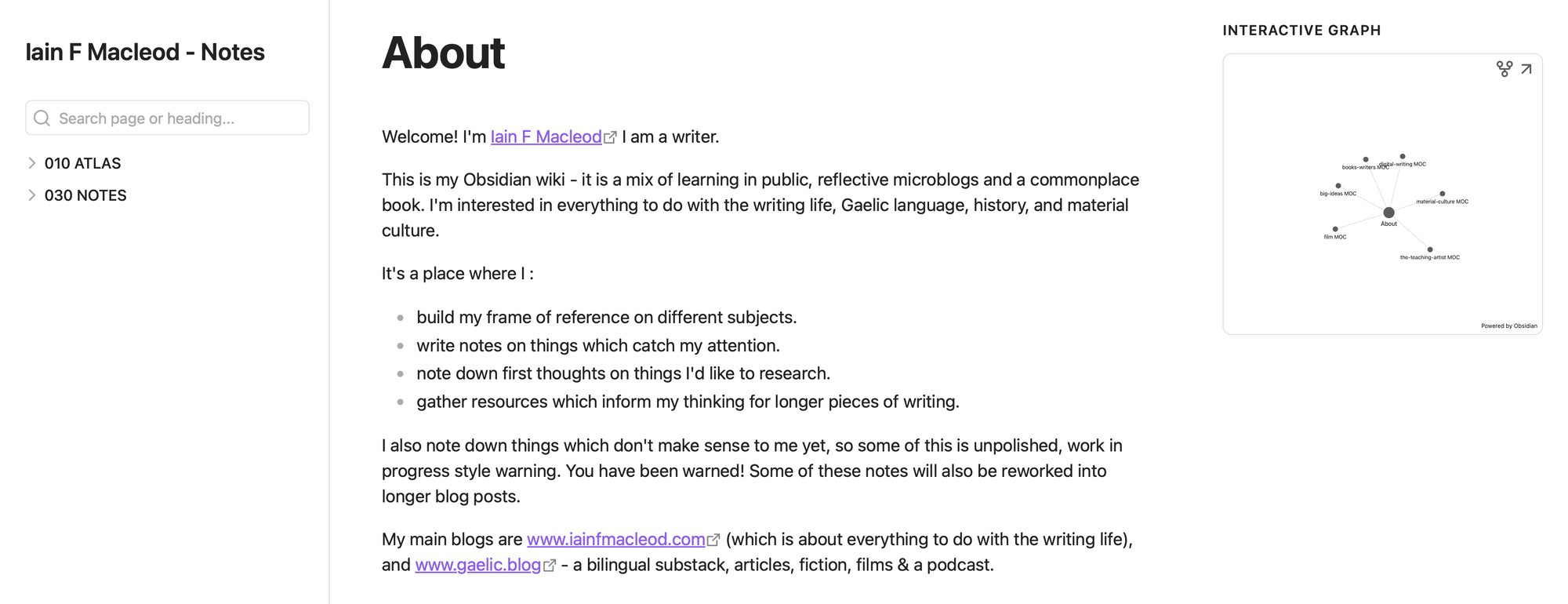
You can customise it as much as you like, though. If you create a note called publish.css you can update the styling to anything you please as it overrides Obsidian's default styles.
The Pros and Cons of Going Public
I'll be honest, I've been round the houses with this.
So on the one hand, an Obsidian site is super fast - which keeps Google Core Web Vitals happy. It could be fantastic for your SEO. Your readers get an in-depth look at your writing process and you get a great outlet for your writing and showing your ideas.
On the other hand, your writing might end up a high-calorific snack for an LLM looking for training material. And with AI Search now often using people's writing, re-versioning their work and not giving credit for it or linking to it, sometimes one thinks - is working for Google for free really worth my time?
Protecting your online writing is important. Here are some options :
You could keep it entirely private, allowing things to be messy when they need to be. It's there purely to aid your thinking. There's something to be said for Obsidian to be a private generator of ideas.
You could password protect the site and share the password with your subscribers. You are sacrificing any SEO gains but it would be a lot of added value for subscribers.
You can keep bots out by using the Cloudflare facility called Turnstile, where people have to click a button to confirm they're human. Just type 'turnstile' into the quick search box on Cloudflare. It keeps bots out, but also, you might want to be found by AI search and this option stops that.
The approach I am taking is that similar to original Zettelkasten method, one folder is for notes and the other is for ideas - the unexpected insights of areas linking in unexpected ways. I don't publish my ideas folder. At the moment my vault is for subscribers.
Routes to publish
I use Obsidian Publish to publish my own vault although there are ways to do it without going down this route. This costs (in 2026) $10 a month and it is cheaper if you pay for a year.
There are two reasons I use Obsidian Publish. I think I should be paying for such an amazing piece of kit, and I just want something that works out of the box.
One free route involves linking the Digital Garden plugin to GitHub, then connecting it to a service like Vercel to host your site for free. Or you could use Quartz through Github.
Obsidian Publish gives you a url on their own domain, something like publish.obsidian.md/your-site-name. So you don't need a sub-domain if you don't want.
Obsidian have lots of information at this URL - https://obsidian.md/help/publish
Obsidian on a sub-domain or a sub-directory?
Ok, I feel like an Obsidian crash-test dummy at the moment.
You can either publish Obsidian as your main website (www.yoursite.com), or as a subdomain- something like notes.yoursite.com. Or as a sub-directory i.e www.yoursite.com/notes
It is better for SEO for your Obsidian site to be on a sub-directory i.e www.mydomain/notes. Here is a good in-depth article about sub-domain SEO on trydecoding.com
I went round the houses with this. I wanted to set it up as a sub-directory, using Cloudflare. I have Ghost Pro hosted as my main site
I set up a worker in Cloudflare which should have been catching any visits to www.mysite/notes and showing the Obsidian site. Oh look a rabbit hole! In short, it was conflicting with the hosted Ghost site.
Ghost unfortunately makes you pay through the nose for setting up a sub-directory. Here is info on the Ghost website r.e. creating a sub-directory on Ghost.
But I want to get out of the rabbit hole and so, I'm stuck with the sub-domain.
Setting up your sub-domain on Cloudflare
Setting up your sub-domain on Cloudflare is easy. You have to have the DNS of your site on Cloudflare. Even if you use Ghost on your main site (which you shouldn't proxy), you can proxy the sub-domain. Otherwise it won't work.
Proxying means all your traffic flows through Cloudflare rather than Cloudflare just pointing people to where your site lives.
It's very easy. You go to your domain in Cloudflare. The DNS settings (Records) are in the left menu for your domain.
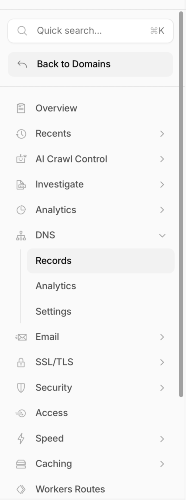
You add a record - a CNAME record and add the following info:
Name:
notes (or whatever you want to name your sub-domain)Target:
publish-main.obsidian.mdProxy: orange cloud (proxied)
That's your sub-domain sorted.
The Obsidian Publishing Process
Go to obsidian.md/publish (you need to have an Obsidian account). Click Publish and it takes you to a screen where you pay your hard earned money.
Welcome, welcome and all that. After paying, you can go to your desktop Obsidian app. In the bottom left of the left hand side menu is a paper plane. You click on that and it opens the publishing 'area', I guess you could call it.
It's a simple screen, designed in the distant past on a Commodore 64 by someone wearing ski gloves. However, all you have to do is click the box for the folders you want to publish (they will be in the 'new' section). Then press publish!
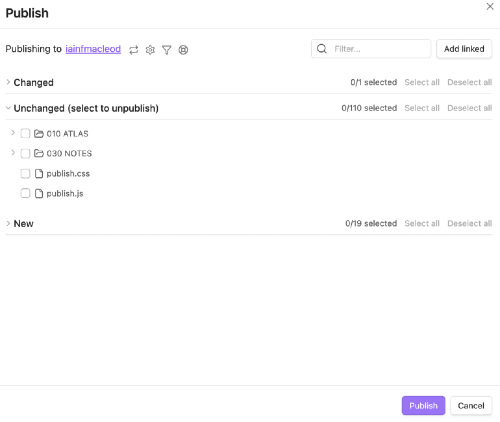
One thing to remember - if you work on a new note on your desktop, it will still live in the 'new' section, until you take the step of publishing it.
Important Obsidian Publish Menu Items
There are a number of important menu settings to look at (site options, they call them). You can get to them by clicking on the little cog, you can see it in the previous image.
So some things to look at. You can set up your Obsidian home page by writing a note with the title you want. I use 'About' so it appears early in the menu. it's the second menu item down : Homepage file.
Also in the 'General' section is the menu heading for organising your custom domain. You've set up your sub-domain already in Cloudflare, you just add that there. It's very simple.
And down at the bottom - you can set a global password for your site. Or ask for it not to be indexed.
There is also a place to put Google Analytics tracking code. I use Plausible instead for various reasons. It has better privacy for readers (it doesn't track people across the web), and it is much better at filtering bot noise out. This requires a little workaround.
Adding Analytics to your Obsidian Site
It's simple for Google Analytics, but there is one small annoying thing about it if you use something like Plausible Analytics.
For Google Analytics, at the bottom of the site options menu (airplane, cog, then you're there), you just add your tracking code.
For Plausible it's not quite as simple. You create a note called 'publish.js' and add your Plausible code there (or from other Analytics services). It must live in the top level of your folder structure.
Obsidian then treats this as JavaScript and runs it.
Also, at this stage you can see the publish.js note along with your published ones. To hide it on your website - in the site settings you go to 'Customise Navigation'. There you can choose notes you want to hide from the viewer.
You still see it in your own Obsidian app though, with the other notes, which is a bit of a pain.
Limitations for Hosting Media Files on Obsidian
Obsidian Publish themselves say that they are "not optimized for streaming video or large audio files." There are a number of publishing limitations which Obsidian highlight. It's not built for streaming or hosting media.
But, Cloudflare to the rescue again! You can host your media on Cloudflare R2. You can get an AI to take you through the simple steps to do this. The main things are you get 10Gb storage and ten million (ten million!) 'reads' for free (people downloading your media), which is amazing. And it's very cheap for extra.
You have to give them payment details in case you go over the limit. You find R2 in the Cloudflare menu. You set up what's called a bucket and put some media into it. You make the bucket public. And you have to set up a sub-domain where it lives, like media.your-site.com. It's as easy as adding a record in your DNS. (I think I might write a plain-English post on DNS, it saves a lot of time and money being able to do it yourself.)
Thanks for reading. If you do go ahead and publish your site, get in touch on LinkedIn and share it!