Using Claude Cowork for Grant Writing
Claude Cowork. It was the best of tools. It was the worst of tools.
Claude Cowork is a great tool, allowing you to work on a task in a permitted folder of documents, where the app can add or edit documents.
It's genuinely impressive. But it's early days. And there is a limiting factor when it comes to using it with clients - how it handles your data.
In this post:
- How is Cowork different to Chat?
- Cowork Tasks and Projects
- Getting set up with Claude Cowork
- Why Cowork is good for grant writing
- The ways Claude Cowork is not good for grant writing
The main pillar post in this series on grant-writing is Grant-Writing for Writers and Artists.
How is Cowork different to Chat?
The main difference to an LLM is that in Cowork you work towards a goal rather than asking questions. You can connect it to a folder and external tools like calendars and email. So it can pull in the information it needs rather than asking you to supply everything manually.
You can delegate tasks to it and watch its thinking as it progresses. And it often stops to ask you questions when it needs more direction, sometimes giving you multiple choice options.
You can build a great context architecture around your resources, using grounded data.
Cowork Tasks and Projects
A few words about the architecture of Claude Cowork.
A Claude Cowork Project is like a container for all your sessions in a given area of work. A "task" is Claude's term for a conversation. In a project you can create multiple conversations (tasks.)
In a project you can do things like add information on how you would like Claude to act. For example you can ask Claude to always act like a professional grant writer.
When you create the project, you can add files to it which are relevant to your work - for example, strategy documents from funding bodies you write grants for. Claude stores these in a folder on your computer. You can also share other folders in the tasks.
So let's say you start a task in Cowork. You are given the option to work in a project. So all that context and information is already there for you.
You can delete these "tasks" (conversations). If you do, according to the UI, Claude says it is removed straight away from their servers.
But you can only archive a project.
Getting set up with Claude Cowork
You need a paid account for Claude Cowork, but it's a small amount for the value you get from it. You also need the desktop version of the app for Cowork.
When signing up, it's worth bearing in mind that you can't change the email you sign up with. You have to delete your account and create a new one if you want to do that.
In settings - turn off model training. Give it limited access to start with to documents without any sensitive information. Don't give it access to your whole documents folder. Create a dedicated folder you pull docs into.
Then, the simplest thing to do is set up an account and ask Claude to walk you through it.
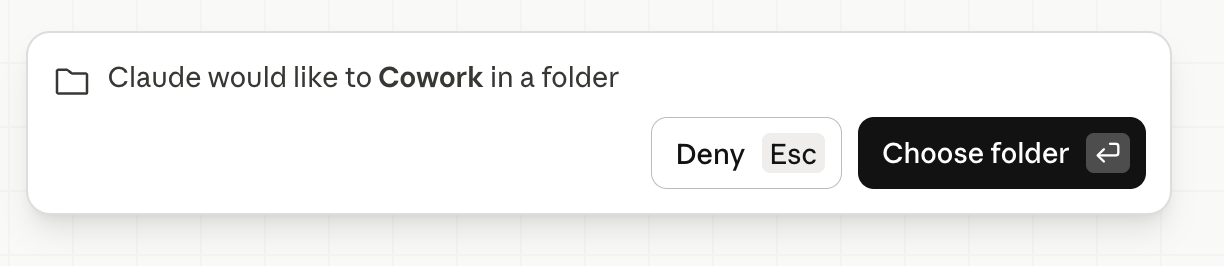
One thing I found was that I couldn't find the button for allowing folder sharing - but you can say to Claude Cowork you want to do it and it shows you the following:
You have a choice of models, with the most advanced thinking model taking longer over the task. But the more powerful the model you choose, the faster it eats your usage limit - and once you do that it locks you out of the app (we're talking hours, which isn't great if you have a deadline.)
One useful thing to do is assign a key on the keyboard for dictation, like control pressed twice - makes it much quicker than typing.
Why Cowork is good for grant writing
The main reason Cowork is useful, I think, is that it allows you to build a library of resources for your grant writing, which you can access and analyse in the app. Policies, context, reading around the subject… you can interrogate it all easily in Cowork.
For example, one of the docs might be the UK Government's Guide to developing the Project Business Case. As the data is grounded, you can ask whatever questions you want about, say the Five Case Model. You can find themes between different policies from different organisations. In short, it allows you to handle a large amount of data with ease and helps your thinking.
And you can have all of your referencer documents in a project, they're ready to go for any new grant you're writing.
The ways Claude Cowork is not good for grant writing
It's good for organising research, finding sources etc. but I wouldn't use it to write the actual text for an application. Using your own voice is the way to stand out from the crowd.
How Claude handles your data at the moment is sub-optimal, especially from a company that referred to itself as safety first when it first introduced Claude in 2023. In February 2026, according to TIME Magazine, Anthropic dropped this claim.
In 2023, Anthropic committed to never train an AI system unless it could guarantee in advance that the company’s safety measures were adequate. For years, its leaders touted that promise—the central pillar of their Responsible Scaling Policy (RSP)—as evidence that they are a responsible company that would withstand market incentives to rush to develop a potentially dangerous technology.
How does that manifest in the product? You can't easily delete your data, is how. And it's a little complicated. This is compounded by the fact Claude seems to sometimes offer contradictory advice. It's better to go back to the original documentation from Anthropic - Claude Support.
Deleting conversations in chat
You can delete conversations in Chat, and then they are fully deleted from the Anthropic servers in thirty days. As of September 2026:
If you use our consumer offerings (e.g. Free Claude.ai, Claude Pro plan), your prompts and conversations will remain available to you in your dashboard so that you can see your conversation history. You have control to delete your conversations, which will be immediately deleted from your conversation history and automatically deleted from our back-end within 30 days. (privacy.claude.com)
Managing data in a Claude Cowork Project
There are three things to consider in Claude Cowork Project. The task (which just means the chat), the files you added to the project and the project container itself.
A project can hold multiple "tasks" (a fancy word for chat) plus shared context files.
Deleting a "task" inside a Claude Cowork project
A "task" inside a project just means "a chat". The UI says that this is deleted straight away.
Deleting files inside a Claude Cowork project
Files in your connected folder (in the project) live on your computer, so deleting them there removes the file itself.
Deleting the Claude Cowork Project Container
You can only archive your Claude Cowork Projects. At the moment, to delete them you have to email Anthropic to ask for it to be done. I've never received a confirmation email back for this.
Claude stores the session — the chat log, its outputs, and any file content it touched — on Anthropic's servers, and that's covered by a separate retention/deletion process.
And so, you are better off working on more sensitive documents in the task rather than having them in a project, which makes Cowork… a little less useful than it could have been if they had shipped it with better privacy controls.
All that being said, it's still mightily impressive.
You can also combine Claude Cowork with Obsidian for a great grant writing workflow. I've written a post about getting started with Obsidian.