SEO for writers, creatives and arts organisations
This section on digital writing will have a few posts on SEO (Search Engine Optimisation) in it, because I think it's within everyone's grasp (writers, artists, arts organisations and so on) to learn enough SEO to be able to take care of their own websites.
This is written for people who want a first introduction to the subject. If there is any jargon, I try and explain it.
At the same time as thinking of online discoverability, we need to be thinking of protecting our online writing. Unless you opt-out, many companies such as LinkedIn and Substack are using your data to train Large Language Models.
In this post :
- What is SEO?
- Why writers need SEO?
- Find which pages Google has indexed
- What is metadata?
- Google Search Console - an essential tool
- Keywords, backlinks and internal links
- What are canonical tags?
- What are jump links?
- FAQ Schema
- SEO Resources for writers and artists
What is SEO
SEO helps your readers find their way around your site in the best way possible. It also allows Google to do this as well (and other search engines such as Bing.) Their aim is to map your and return the best answer possible to a person who inputs a search query into Google. Google puts it this way :
When you built your website, you likely created it with your users in mind, trying to make it easy for them to find and explore your content. One of those users is a search engine, which helps people discover your content. SEO—short for search engine optimization—is about helping search engines understand your content, and helping users find your site and make a decision about whether they should visit your site through a search engine.
Their bots (also called spiders) analyse the content in your website, if your pages link internally, if there are duplicates of your content, whether there are missing pages and so on.
It looks at how you organise the page - whether you use different title tags as headings in your text (H1 (heading 1) H2 (heading 2). Is a reader on a mobile phone having to navigate a wall of text? Google have moved to mobile first indexing now, so they look at this. It also helps GAI apps like Gemini find the content for the text boxes and links they return for searches in the app.
You can add headings, links etc usually by highlighting some text, then a wee box with options comes up.
It looks at your page's authority. They are clear they are looking for what they call E-E-A-R. Experience, Expertise, Authoritativeness, and Trustworthiness.
Google are pretty clear about what they are looking for.
This is the official documentation for the "rules of the road." It covers the technical requirements to ensure your Ghost site is crawlable and indexable. These two documents cover it in detail:
Google Search Essentials (formerly Webmaster Guidelines) and the very long Search Quality Evaluator Guidelines.
But in short, Google Gemini is handy this area. But be careful, the advice it gives if you are deep in the weeds can sometimes not be ideal.
If you are interested in bilingual blogging, I have written about it here - Blogging in a Minority Language.
Why writers need SEO
Let's look at different models of blogging. That will help show how much you would like to engage with SEO. But in short, you put a lot of work into your work and website, so it makes sense for it to be as well presented and accessible as possible.
Looking at a writer I really like, Geoff Monaugh, his blog BLD BLG has long essays where you see his thinking as he makes links between many subjects. He has a big readership because of the quality of his writing. He is not writing so that an algorithm finds his work and presents it as an answer to someone's queries. You have to read a post from beginning to end.
He talks about it in the post The Ghost of Cognition Past, or Thinking Like An Algorithm.
One of many things I love about writing—that is, engaging in writing as an activity—is how it facilitates a discovery of connections between otherwise unrelated things. Writing reveals and even relies upon analogies, metaphors, and unexpected similarities: there is resonance between a story in the news and a medieval European folktale, say, or between a photo taken in a war-wrecked city and an 18th-century landscape painting. These sorts of relations might remain dormant or unnoticed until writing brings them to the foreground: previously unconnected topics and themes begin to interact, developing meanings not present in those original subjects on their own.
You could also blog as a writing habit like Seth Godin. His blog is called SETH'S BLOG. He publishes some writing every day. It uses the 'streak as a tool' method. If your question is 'shall I write something today?' the answer is always yes.
Godin might just write a paragraph or two. He doesn't care if Google thinks the content is 'thin'. He blogs for other reasons. And also, Seth is one of the main thinkers and writers about writing and so people search him out. His book Permission Marketing is all about this, it's a marketing classing.
Find which pages Google has indexed
For a rough idea of what pages Google has indexed for your website you can paste the 'site operator' in your browser bar - site:www.yourdomain.com. Don't put a space after the colon.
Apparently there can be discrepancies between what this tells you and the reality, but it's a good approximation. But if there is a big difference between what is appearing here and what is on your website, a look under the hood is needed.
You can find the sitemap of your website, usually, using at a url like https://www.yourdomain.com/sitemap.xml
This should show all your posts and pages. For example, here is a link to the sitemap of this site - sitemap for www.iainfmacleod.com
You can submit your sitemap to Google Search Console and it helps Google with the structure of your site.
What is metadata?
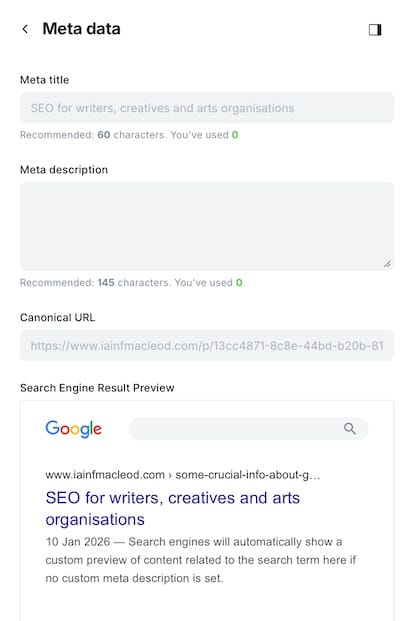
Part of the work will involve looking at the metadata - the extra data you're giving search tools about your site to help them categorise it. For example, here is the metadata area for a Ghost post. The meta description is what search engines show in the text portion at the bottom of the shot. I talk about the canonical url below.
Google Search Console - an essential tool
For much better results, the best tool to get is Google Search Console. It isn't like Google Analytics in that it gives you data on how your site is doing in search. How many impressions, how many people have clicked,
There is a lot of useful data - for example, if you have pages which are going nowhere (404 errors), if you have pages which Google knows exist but haven't indexed yet.
Google doesn't index everything. There are many reasons for this, a page's content could be too thin. A more comprehensive post could be elsewhere on your site, It might be an 'orphan page' - where there are no other pages on your site pointing to it, so Google thinks it isn't part of your site ecosystem.
Keywords, backlinks and internal links
Keywords
In short, a keyword is the word or phrase that someone types into Google to find an answer. So you can adjust the clarity of your heading and especially the first hundred words of your text accordingly. For example 'needs' is too broad. "Maslow's pyramid of needs" is specific and the Google librarian will know what drawer to put you.in.
Don't do 'keyword stuffing' where you use the same keyword ad nauseam.
There are tools to research keywords like SEMRush, which is very good but expensive. It'll help you make a list of the keywords you could include
You could of course just write what you want to write, and your audience will find you because of your writing.
Internal Links
Internal links are the links you add in a post to your other posts. For example, here is a link to a post I wrote called The Joy of Blogging.
They are important because if you don't add any internal links to a page, Google classes it as an 'orphan page'. As it isn't tied in to the rest of your work it's out on a limb and google thinks it doesn't matter so much.
Backlinks
Backlinks are very interesting. They are extremely important. They are other sites linking to you.
In the 1990s, Google modelled their page ranking system on the way academic citations worked. In academia, the more citations a paper has, the more authoritative it is considered to be.
Some backlinks are more authoritative than others. For example, if the BBC linked to you, it would give you a lot more link juice as Google has a high level of trust in them. If a small hobby page linked to you, it wouldn't have the same levels of authority.
Linking to other sites on the internet
There used to be a view that if you linked to too many outside sites, that you were going too much of your 'link juice' away.
Link juice is the "value" or "authority" that passes from one website to another through a link.
However, the view now is that linking to other resources is a good thing to do, otherwise Google sees you as an 'internet dead end'. I used to not add any amazon associate links, for example, but apparently that is a good thing to do now. It helps close the query.
The main thing on Google's mind is - did the person who inputted a search query get what they want.
What are canonical tags?
A canonical tag is where some sites give you the option to input which post Google should think of as the main source of truth for that particular piece of writing. Google sometimes chooses to ignore this, but it's an important concept.
How the wrong canonical affects your sitemap
So I learnt something very important about the Ghost blogging platform today. I like using Ghost for blogging for many reasons. It's got a nice interface for writing and I like how I helps you handle SEO. With Substack, for example, SEO isn't their priority, being mainly an email newsletter platform.
Marking which versions of your posts are canonical is very important for Google to choose which version to index. I only have them in one place, but some writers have say, a blog version and a version on Medium. Saying they are canonical means thank you google, this is the one to index.
In the metadata, Ghost has a section for 'canonical name'. It populates it in grey - Naturally you think, I should fill this in. This is what I was doing.
The only issue then is that Ghost then thinks that the post has a different canonical address - even when you paste in the same url. It thinks there is another version of what you have written somewhere else.
The issue with this is that the posts then don't turn up on your sitemap.
I was missing half my posts on it because I was populating the 'canonical name' section. This led to issues with which posts were getting indexed, Google Search Console thinking there was another version somewhere else.
I started removing the urls from the 'canonical' section, and like magic, they started appearing on my sitemap again.
What are jump links?
I have added an example of jump links at the start of this post. It is like a table of contents where you can click on the text and it takes you to that section in the page.
I would only add them to certain types of post - where this is a lot of info it helps the reader scan the post quickly and return to sections as needed.
In 2026, Google loves jump links (table of contents). They often use these to create "Site Links" directly in the search results, allowing users to jump straight to your section in the search results.
I've written a detailed post called 'How to create jump links in Ghost' and the idea is the same in other platforms, although the way to action in can vary slightly.
FAQ Schema
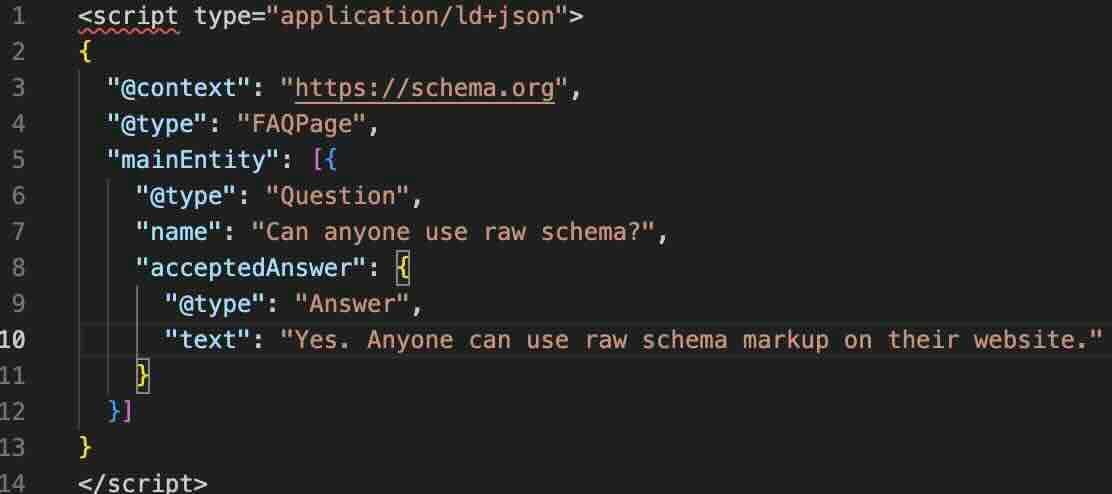
FAQ schema is a small piece of structured data you add to a webpage to tell search engines, “this page contains clear questions and answers.” It doesn’t change what readers see on the page, but it helps Google understand the content more precisely.
If you add this to the head of your page, your questions and answers might also appear directly in search results. They might be eligible to appear in 'rich results' - like the premium Michelin Star version of a search result.
It should only be used on pages where you genuinely answer common questions and there is a clear answer.
Here is an example of what it looks like.
There is a website - schema.org - if you want a deep dive into the subject.
SEO resources for writers and artists
If you have questions I can help with, or ideas for more resources (walk-through videos etc), leave a comment if that would be helpful.
I've written a post (with a video) on how to get started with Obsidian. Obsidian is a note-taking system where you can :
Link anything and everything — ideas, people, places, books, and beyond. Invent your own personal Wikipedia.
I think it's the best thing I've found yet for recording thoughts, ideas and links to resources And also, you can publish your Obsidian wiki (or selected parts of it) to the web) which is great for SEO.
For information - I earn commission from qualifying purchases for referral links i.e Amazon Associates. This helps support the site at no extra cost to you.
allSimple web hosting - Martin and the team at allSimple set up a self-hosted Ghost website for me. I couldn't recommend them enough, they really go the extra mile and are very skilled and patient. You can get your web domain there and hosting.
Self-hosting Ghost is good. It saves money, although there are a couple of things you need to organise such as the newsletter sending (I use kit.com for another self-hosted Ghost site), you only get basic analytics and you are not part of the Fediverse - (here's a wikipedia link). But still, these things are fun to set up and very powerful.
And when it comes to analytics, I'd recommend Plausible.io rather than Google Analytics, they are much better at screening bots who visit your site, so you get a more truthful picture.
Here is a referral link to allSimple Web Hosting
The Google Starter Guide - A good place to start is to hear it from the horse's mouth. On this page Google sums up their advice for SEO best practices.
Mozilla has a Beginner's Guide to SEO, but they still can't help themselves using abbreviations and terms without explaining them - SERPS, High CTR - but it might be worth a look.
Permission Marketing by Seth Godin
Ok that's enough for tonight. I'm off to watch King Lear on Amazon Prime. - Anthony Hopkins, Emma Thompson, Emma Watson... heavens, it's good.