A Guide to Bilingual Blogging
I cover key areas to think about when setting up a bilingual blog. Also, essential info if you are going to start a minority language blog.
Some of the key areas to consider are the importance of canonical posts, Wordpress vs other blogging platforms - and how to make sure your page set-up is correct for bilingual pages.
In this post, I include a 'no prior knowledge' explanation of HTML - a little knowledge of which is invaluable to bloggers. It allows you to organise your page language versions and much more.
I also talk about some of the particular issues which face minority language blogs and also, why bilingual blogs are so valuable,
In this post :
- Canonical posts and bilingual blogging
- Fully bilingual websites vs blogging platforms
- Google's advice on handling multilingual sites
- HTML basics for bloggers
- Using your new HTML superpower
- The hreflang set-up for bilingual pages
- SEO for bilingual blogging
- Blogging in a minority language
- A minority language keyword experiment
- The takeaway
Let's get started! Los geht’s! On y va ! Andiamo!
Canonical posts and bilingual blogging
This is a key concept and it needs to be addressed on whichever platform is being used.
Here is a little info on what canonical means. Without clear information on which page is canonical i.e the one page to rule them all, Google treats the two languages as unrelated pages and may rank or show the wrong one. For example, your English version might be the one that appears in Google search results, with no sign of the version in the other language.
Or without a canonical page it may think you are being spammy and trying to double up on content, and for that you will pay. Not like King Lear pay, but you will pay.
An important note - if you are using Ghost do not write anything in the canonical box, or it will cause severe difficulties.
Fully bilingual websites vs blogging platforms
Some websites can be set up to be fully bilingual. Wordpress uses plug-ins like WPML (WordPress Multilingual Plugin) for this.
You can create anything on Wordpress, but that means it's far from being the blogging platform it started out as. The amount of plug-ins needed can slow the site down considerably and also get in the way if you just want to write.
Saying that, Google says slower sites aren't penalised if the content is great. And Wordpress has so many developers etc who are adept at using it. It's one to ad to the mix.
Most blogging sites don't have this bilingual capability, and for that, you have to go through a different process. I'll go over this here.
Luckily, learning a little about this also gives us some very important blogging skills. I will try and unpack it as simply as possible.
Google's advice on handling multilingual sites
So Google are clear about how to handle the same page in multiple languages. If you don't handle it properly, Google thinks you are trying to duplicate content to get more attention.
Here is detailed information : Managing multi-regional and multilingual sites in Google Search Central.
Google recommends using different URLs for each language version of a page. But then you have to add a little bit of code to make it clear to Google which URL is the English version and which is the other language.
You add this in the header of your web page. What is a header? For bloggers, a small amount of knowledge in this area can go a long way. Let's get our fundamentals on.
These next sections assume no prior knowledge.
HTML basics for bloggers
First, this is going to save you a lot of money. Second, you can do a lot with this, which saves you waiting for other people to help. Here are HTML basics for bloggers.
A lot of the time if you want to add some functionality to your website, say Google Analytics, GA says - take this lump of code and paste it in your header.
This next section will show you how easy this is to do. If you can cut and paste you are golden.
Here is a simple explanation,
As you are made of star dust, the stuff of which your web pages is made of is HTML (Hypertext Markup Language).
This is what gives your website page a structure. It tells a browser reading it if there is a heading, if text is a paragraph, and so on. (A browser is something like Chrome, Edge or Safari.)
An HTML page is made up of an opening declaration, a head, a body and a footer. There's an example below.
The document type declaration shouts at the browser, this is HTML! Now that it has kicked off it tells you - this page is in English!
The head is not seen on screen. It tells the browser how to treat your page. (Nicely, I hope). Use a character set called utf-8 so Gàidhig doesn't look like G`aelic! This is the title of the page! This is the meta title!
The body is all the stuff you see on the page when you are browsing. The footer is part of the body some other stuff like say, social media links. They usually appear in the footer, as they are secondary.
Here is an example of a super simple page in HTML. After reading the above paragraph, you can now read it.
Ps. the <> is just to start each elements and the </> is to close it. So <head> is the start of the head section and </head> is the end. We don't need to be able to write it, we just need to recognise it.
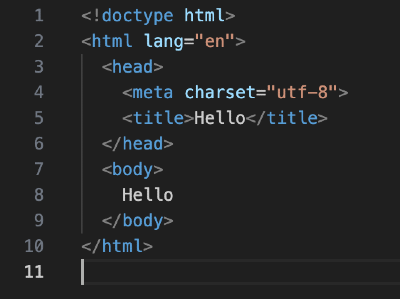
If you want to see what the HTML code of your website looks like you can go to your browser and right click on your web page. You should see something like inspect element on Safari, or inspect on Chrome.
Click that, and then you can see the code of your website. Anyone can see this (as browsers have to be able to read it), but no-one can change it. Well, you can mess about with it in the browser to see how changes might look (everything red!) but it doesn't save it.
There is also a styling languages called CSS - Cascading Style Sheets - which tells the browser how the page should look - colours, fonts, this text is bold etc. And also, Javascript, which is a coding language, which is more for functionality. Fill in this form here, kind of things.
Using your new HTML superpower
It's as simple as cutting and pasting. We don't need to be able to code or even deeply understand it. HOWEVER! You do need to take it from a site you fully trust. Pasting code into your site that the fishmonger wrote in crayon on a paper bag doesn't belong in your site.
So I mentioned above, lots of apps ask you to paste some code in the header if you want to use them. For example, Plausible Analytics might say - add this to your site header.

Let's look at what you would do in Ghost to make it be so. I am using Ghost as they make it so easy. The same concepts apply on other platforms.
You go to settings (the little cog, bottom left of screen) and then type code injection into the search bar. Open it up.
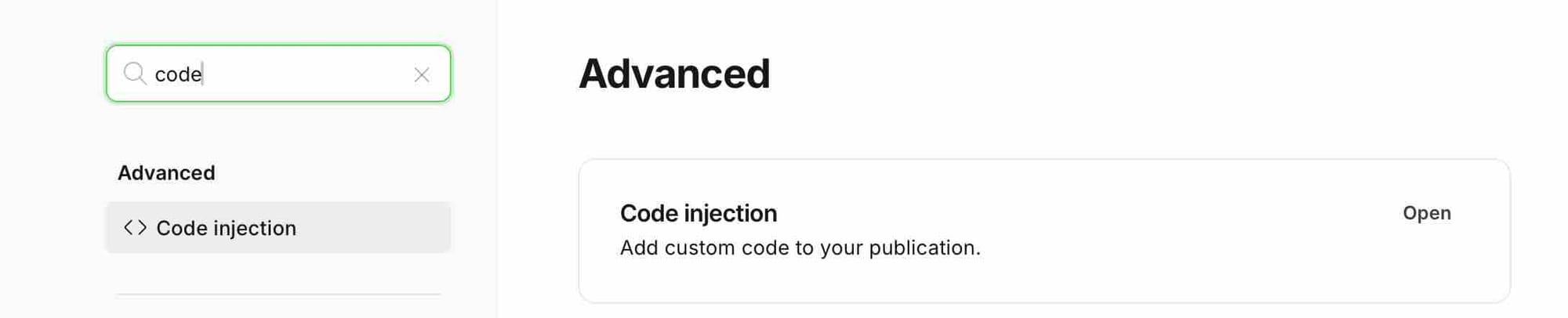
It then gives you an option to add code in the head or the footer of your site. You can do this globally for your site. (Sorry not showing screenshot.)
Or you can do it on an individual page or blog post. When you are working on your post, there's an icon to expand the menu on the right. Here is what that looks like.
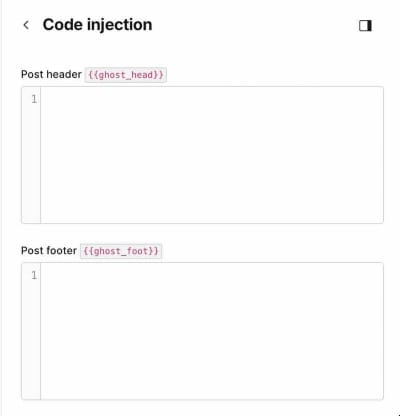
You past your code in the header and that's it done. And if you don't like it, you can delete it.
Bear in mind, other platforms do this slightly differently and some of them, like Substack, don't allow it. So you can't use Plausible Analytics on Substack, for example.
Another important point is that these code snippets can affect your page speed, especially bulky ones like Google Analytics and Meta Pixel. These are designed for tracking people around the web. I'm not into that, so I just use Plausible and have a blazingly fast site. Like, Keyser Söze he's gone before you know it, fast.
The hreflang set-up for bilingual pages
Lets circle back to Google's advice on handling multilingual sites.There is a little bit of HTML to put into the head of the page, which tells Google which language version of the page it is.
If you don't use these tags, Google might see your two versions as "duplicate content" and get confused about which one to show.
You need to put this at the top of every language version of a page.
So you can give the relevant info to something like Gemini (always check your privacy settings) and ask it to create little bits of code for you.
You put the relevant code into the head of each page (example below). Then Google knows this is the same page, just different language versions of it.
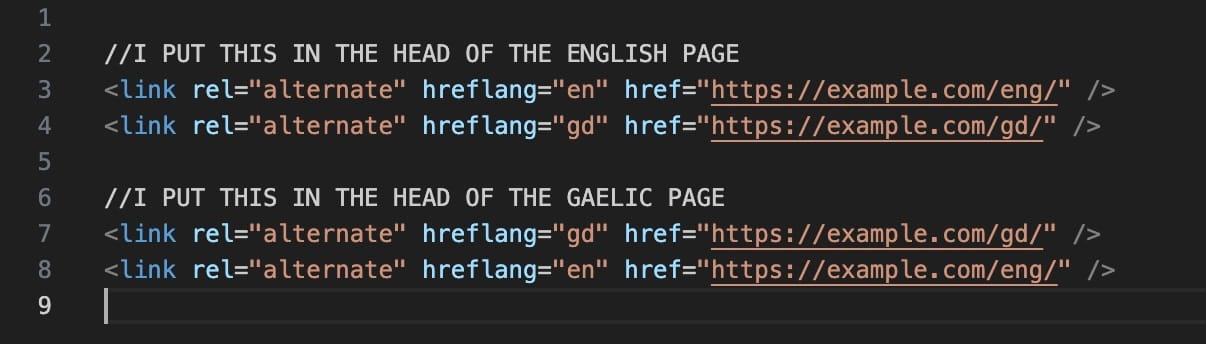
If you are lost, buy can grab screenshots and put them into Gemini and it can guide you. Take it one step at a time to get a clearer output from the wee man in a box.
SEO for bilingual blogging
I have covered this is another post - A Survival Guide to SEO for blogs and bilingual blogging. I mainly use Ghost and Substack to illustrate the issues one will come across.
Blogging in a minority language
Welcome to the thunderdome.
Blogging in a minority language is a fantastic thing to do. It is important that a language has an online domain, where it is the first language of a site and people feel comfortable to make comments in that language.
Data sparsity is an issue, though - for example, keywords are patchier. AI search results can be nonsensical. The first 100-150 words of your text are important, as are your metadata and Google isn't maybe as good at analysing sites in other languages.
One is always being pushed to use English more prominently, in order to serve the master of the one search, Google.
Prof. Will Lamb framed it this way in the Angus Matheson Memorial Lecture (2025) :
When we look at Common Crawl (essentially a linguistically-tagged crawl of the internet), we see that English accounts for nearly half of the data. When you get to the 10th most represented language, Italian, it accounts for only 2%
And minority languages have much, much less data than languages like Italian on the internet. For Scottish Gaelic, Prof. Lamb compared it to a swimming pool being dumped into Lake Windermere.
Making sure the above structure is in place, allows your page to rank on Google. However, it is an issue that Google is so much better at analysing pages in English. It makes you choose between search visibility and prominence of the language.
The great thing about minority language blogging is that community can make up for this.
A minority language keyword experiment
There is a ray of light. I tried an experiment, where I searched in Google AI search using Scottish Gaelic terms. To my surprise, the AI summary was in Gaelic, and all search results were Gaelic pages.
One search I tried returned nonsense in the AI text, but when I grounded it a bit by giving it a website name (which it can amazingly look at in real time), it returned coherent text. Not grammatically perfect, but... I was amazed.
So it does show, even in a minority language like Scottish Gaelic, there is a body of keywords and search does work, if you use it. I tried other languages like Māori and had a similar result, but can't talk to their quality.
The takeaway
Thanks for reading.